
Feature : “Enhanced performance for source document accounting framework” feature.
BUT Something is not right with it…!
Hi Folks,
How are you all, It has been tough time for me. I am unable to get time for writing or supporting in Community since I moved to UK (Which was last October year). I am hardly getting time for my self and my family.
Today after a long time I do not have any work (Basically trailing for work in train so free until I reach) so though let’s share my last experience (which was not pleasant at all) with all of you.
As we all know that Microsoft loves sharing (and enabling by default) new features in every update specially in Dynamics 365 Finance & Operation (AKA D365 FO)and frankly speaking not a single customer or consultant test all features realised by Microsoft.
The same happened to me!
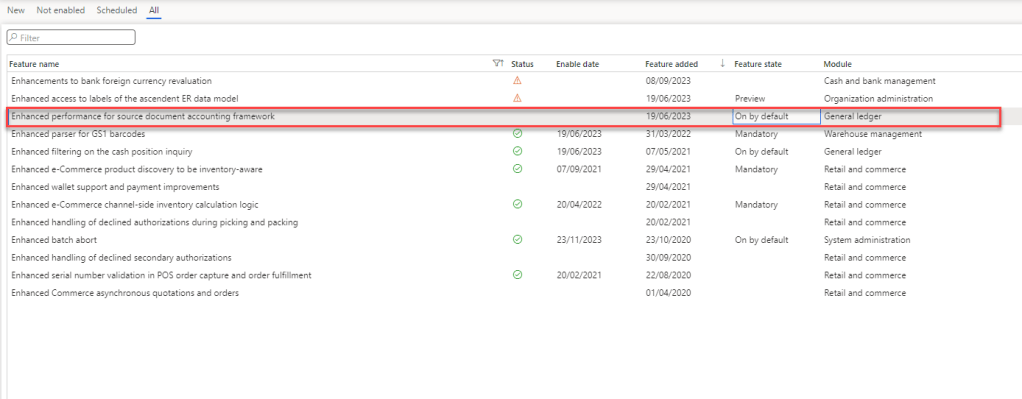
In Last update 10.0.37 (The “October Release”) Microsoft enable the “Enhanced performance for source document accounting framework” feature by default. My team and I was not aware of such feature (Definably it’s my fault).

This feature is supposed to enhance the performance for source document / accounting entry for GL. Following is the notes from the feature:
We’ve added performance improvements to batch postings of source documents in order to run more efficiently. This feature initially will only affect free text invoice batch posting with more source documents to be supported in future releases. When this feature is enabled, batch posting is split into smaller units of work preventing system degradation and lessening the chance of issues due to database disconnections.
Settlement, payment posting at time of invoice posting and localisations are not supported by this feature at this time. When the feature is enabled, posting free text invoices that are subject to settlement, payment posting and localisations will use the legacy posting process.
As this feature only applied to Free text Invoice Posting Using Batch Job (Thank God! They only release for only Freetext Batch Posting and not for all sub ledger) and not to other process such as manual posting of Free text invoice or Sales Invoice or PO Invoice.
Based on details, it seems that this is an excellent feature, and will help to improve performance by separating AR Posting (Sub-ledger) to GL posting (Ledger). So, that we can send invoice to customer without posting accounting entry in GL and accounting entry will be post by system as and when it got extra bit of memory.
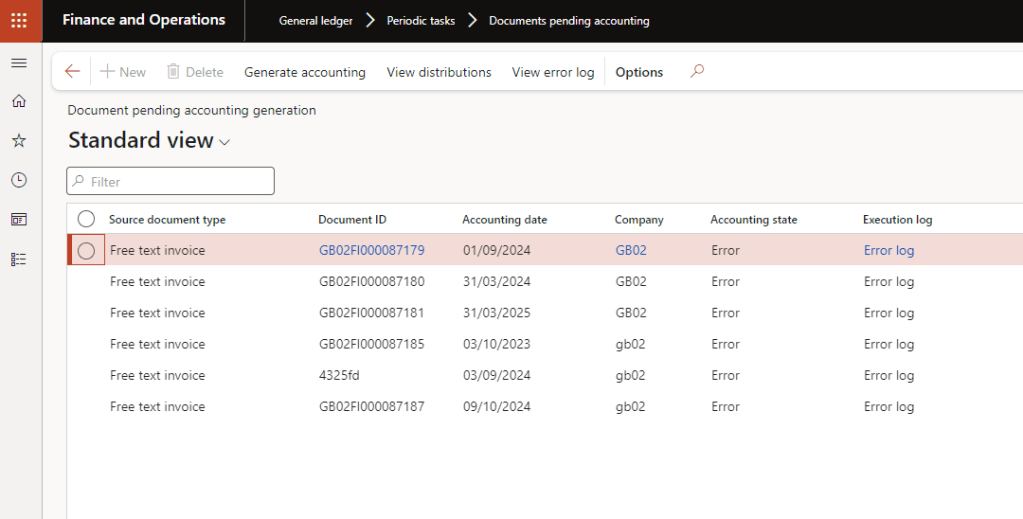
We can see the all pending accounting entry in General Ledger Module > Periodic Task > Documents pending accounting (Which seems an additional “Sub-ledger entry not yet transferred 😊 ”)
Now let’s talk about the problem we identify (Or faced !):
- System ignores the accounting structure validation and post Invoice, but we are unable to post GL Entry.
- This is not something which any accounting team or Finance Consultant agree on.
- Due to this issue, Invoice can be posted in AR / Customer account, but system will throw the error in document pending accounting page, but you do not have any option to update as Invoice is already posted. Specially if the error is related to financial dimension, which cannot be corrected in posted Free text invoice.
- Let’s say you manage to post GL after correcting dimension from accounting distribution, you will have inconsistency between AR Transaction and GL transaction which may cause an issue while financial / internal audit.
- System ignores the financial calendar Period / Period Status:
- This is scary. It happened to me. System can post invoice (in AR Module) period which is closed or period which is not even exist in system.
- The only solution you have is open the period or create the period and post pending accounting entry, post reverse invoice, and don’t forget to close the period.
- System stops showing validation errors while posting manual free text invoice.
- This is also tricky. As per description of feature, it was only supposed to affect batch invoice processing and not manual invoice processing.
- After enabling this feature, system stop processing Accounting Structure and period validation on invoice posting.
- User will get an error message saying posting is cancelled and nothing more. Initially it was mystery to us, but after we identify that this is happening due to this feature.
- You cannot disable this feature if there is any transaction pending in pending accounting page.
- This is tricky. Once we face this issue, so we though, let’s go to feature management and disable the feature. But we checked it was showing as “Mandatory” ☹
- As it was mandatory, we can’t disable it and there is no instruction how to disable the feature.
Now let’s talk about the solution:
- Spuriously system change the status from mandatory to on by default and also allow you to disable the feature if:
- You manage to post all GL Entry which was pending.
Yes, It does change from Mandatory to On by Default and allow us to disable the feature, but please make sure it will be re-enabled on next update. So, please keep in mind to disable it if you are also not planning to use this feature.
We had raised a support ticket with Microsoft, and they agreed and accepted as bug and informed that this will be likely to be (!) corrected in version 10.0.39.
Following is issue logged in LCS for your reference. Details for issue 850125 (dynamics.com)
Let’s hope that this information will help you.
Please let me know your views and experience of D365 FO Feature management in Comment.
Until next time.
Bye,
Hasta luego..
Thank you,
CA Gaurangkumar Jani


 Dynamics 365 Finance
Leave a comment