
Managing financial reporting across multiple jurisdictions can be complex, especially when different legal entities must comply with both local accounting standards and parent company requirements. Microsoft Dynamics 365 Finance offers a robust solution for parallel accounting, ensuring accurate financial reporting while maintaining compliance.
Understanding the Need for Parallel Accounting
Companies operating in multiple countries often face the challenge of maintaining two sets of financial reports:
- Local Authority Compliance – Each legal entity must adhere to country-specific accounting standards, including fixed asset depreciation methods, bad debt provisions, and stock valuation.
- Parent Company Reporting – Subsidiaries must also report financials in a standardized format, such as US GAAP, which may differ from local regulations.
Traditionally, companies manage this by maintaining separate legal entities in their accounting systems—one for local transactions and another for adjustments required for global reporting.
How Dynamics 365 Finance Addresses Parallel Accounting
Microsoft Dynamics 365 Finance simplifies parallel accounting through Operational Layers, allowing businesses to maintain multiple accounting books within a single legal entity. By default, all transactions are recorded in the Current Layer, but additional layers (such as Operational and Tax Layers) can be used for specific reporting needs.
Key Accounting Areas Requiring Parallel Treatment:
- Fixed Assets Accounting
- Provisions for Bad Debts, Stock Value, and Contingent Liabilities
- Other Miscellaneous Adjustments
Approaches to Parallel Accounting in Dynamics 365 Finance
Approach 1: Full Accounting in All Books
This method involves setting up multiple books:
- Local Fixed Asset Book (Current Layer)
- US GAAP Book (Operational Layer)
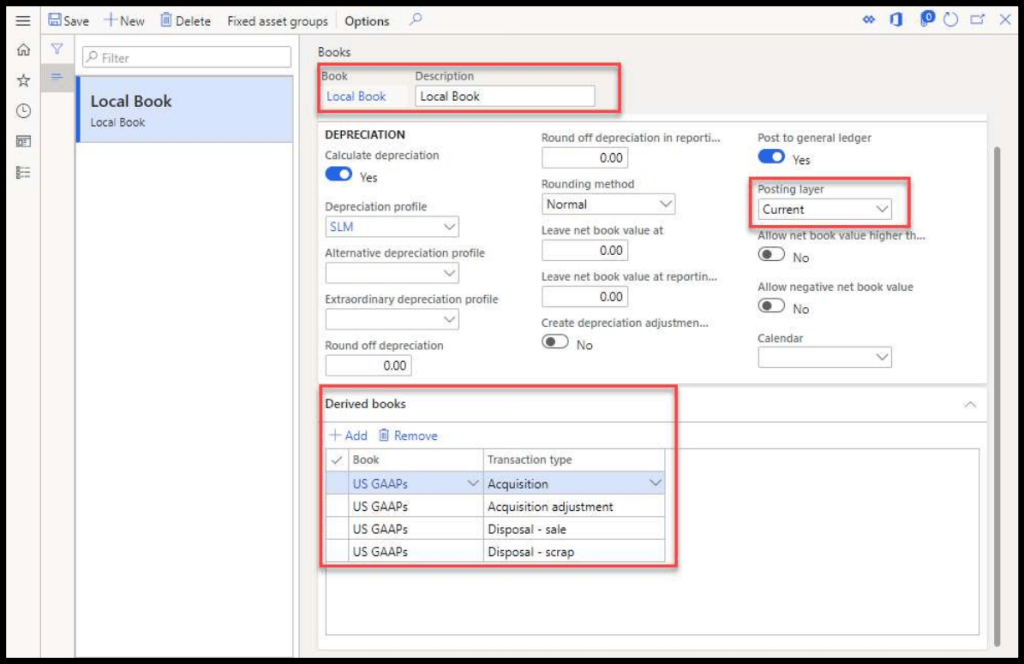
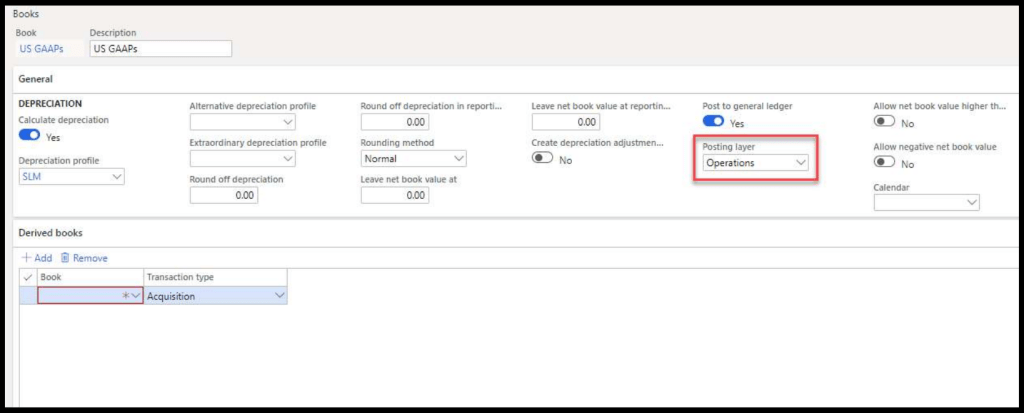
Explanation
Transactions such as acquisitions and disposals are recorded in both layers, while depreciation is handled separately.
Benefits:
- Ensures all transactions are properly recorded across different books.
- Facilitates financial reporting using management reports.
Limitations:
- Trial balance may show double values for fixed assets.
- Requires manual adjustments in management reports for retained earnings.
Approach 2: Full Accounting in All Books, with a Correction Book (Complex)
This approach introduces an additional Correction Book to reverse duplicate values in the Operational Layer.
Configuration:
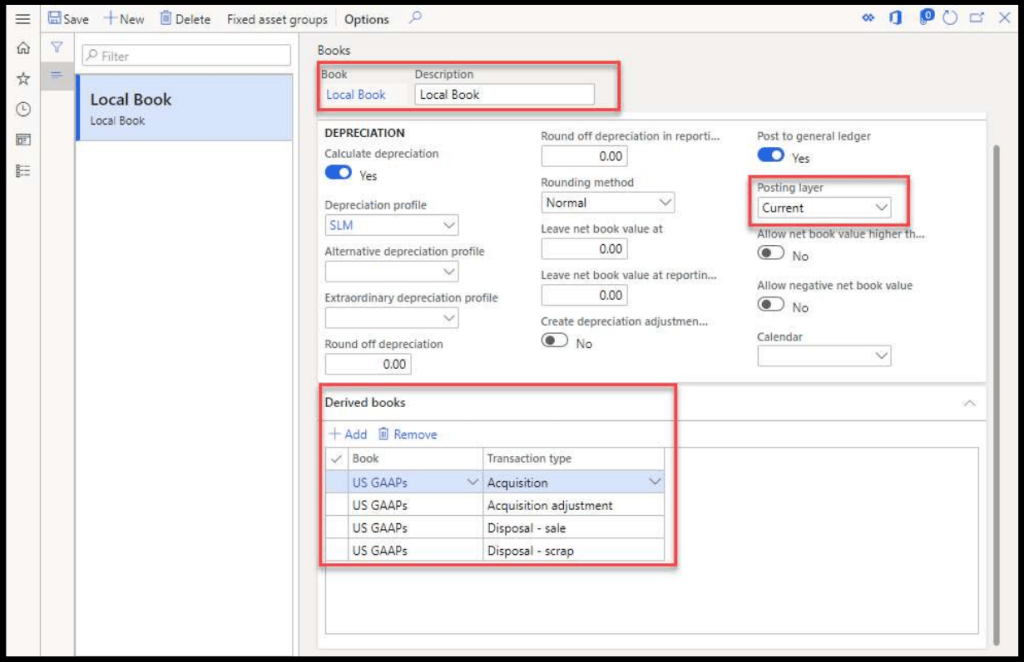
Local Fixed Asset Book (Current Layer)
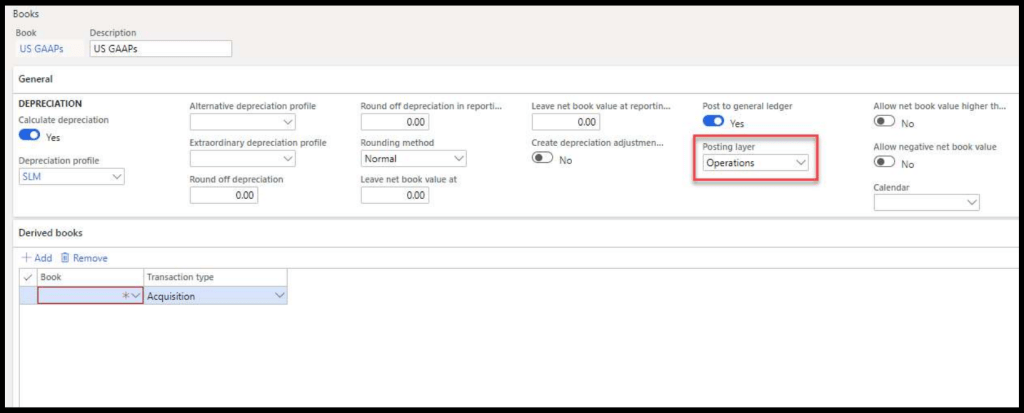
US GAAP Book (Operational Layer)
Correction Book (Operational Layer) — Relation with Local book
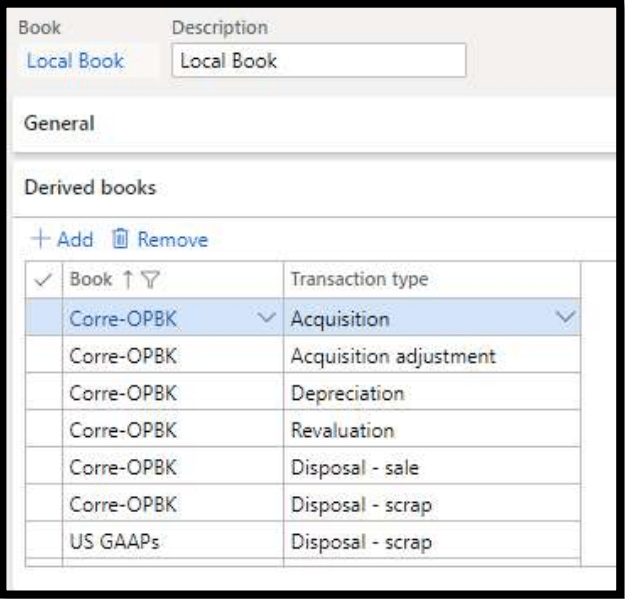
Posting Profile require setting in such way so that all transaction posted in Local book (Current Layer) will be reverse in correction book (Operation Layer). This will help us to remove double amount which showing after posting all transaction in both layers.
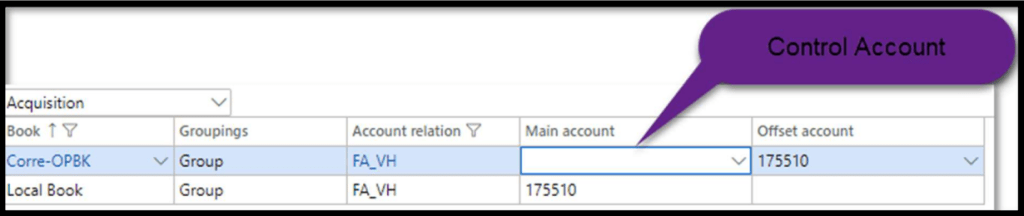
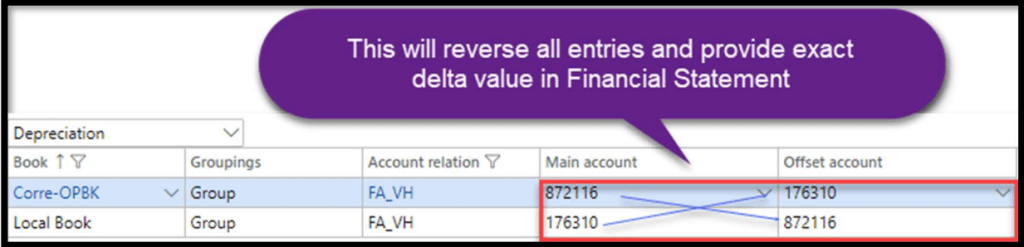
In that way we have to set up for all posting type which will use in local books.
Benefits:
- Automatically reverses duplicate transactions.
- Provides accurate trial balance and financial statements.
Limitations:
- Requires extensive configuration and testing.
- More complex than other approaches.
Approach 3: Full Accounting in Current Layer with Delta Adjustments (Simple)
In this method, all transactions are recorded in the Current Layer, while adjustments for US GAAP are made manually at the end of the period.
Process:
- Transactions are posted in the Local Book.
- Finance teams run the Fixed Asset Book Compare Report.
- Manual adjustments are made in the Operational Layer using General Journal entries.
Local Fixed Asset Book (Current Layer)
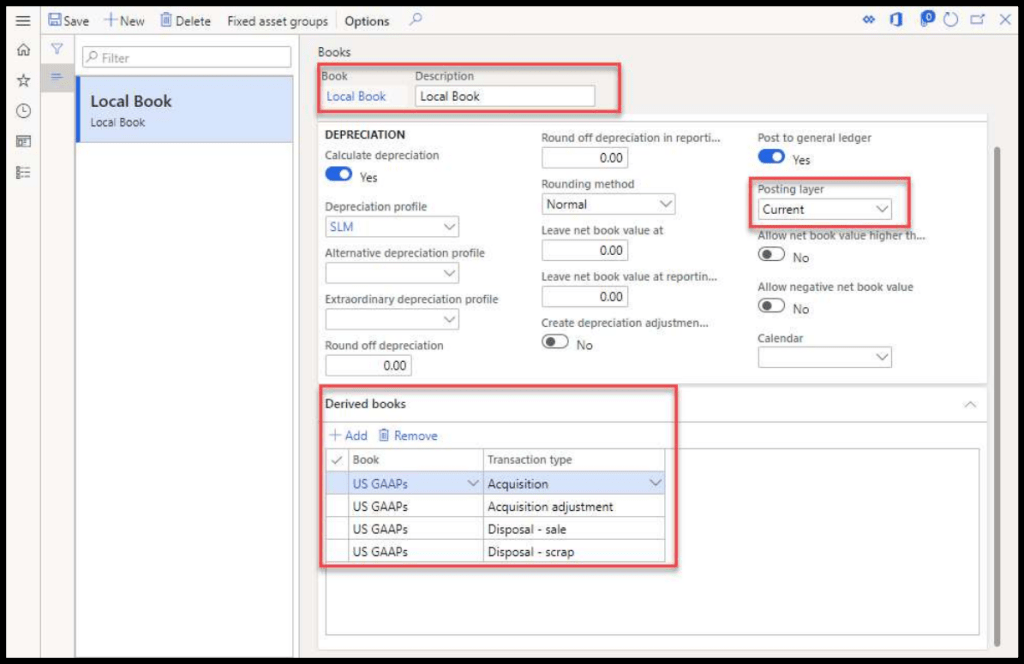
US GAAP Book (No Layer)
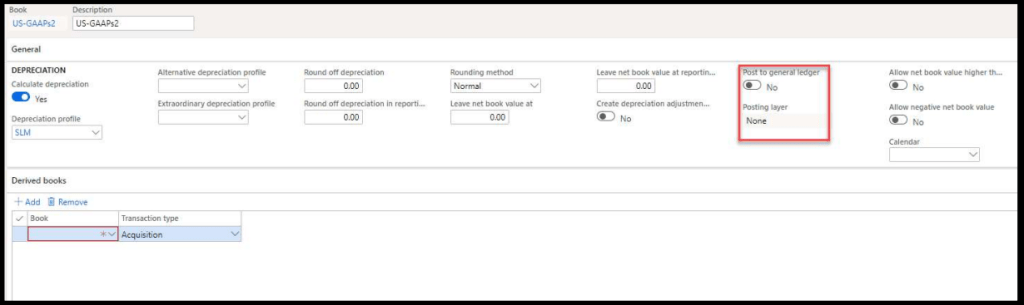
After posting all relevant transaction on specific period end Finance team will run “Fixed Asset Book Compare” Report (Path: Fixed Assets > Inquiry and reports > Transaction Report > Fixed Asset Book compare) This report will provide difference between transaction posted on Local Book and US GAAPs Book.
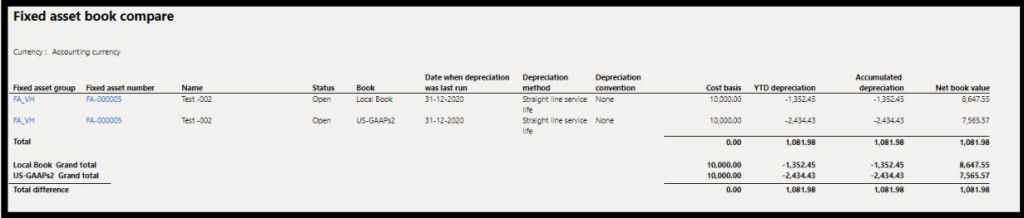
Based on this report Finance team can pass manual adjustment entry in Operation layer using General Journal as provided in Other Accounting approach.
Benefits:
- Simplifies accounting setup.
- Reduces complexity compared to other approaches.
Handling Other Accounting Adjustments
For provisions such as bad debts and stock valuation, adjustments can be made using the Single Approach:
- Post the delta amount in the Operational Layer to align with US GAAP requirements.
Example:
Bad debts provision required in Local laws are $4,000.0 and as per US GAAPs it’s $6,500.00. As in normal accounting (Current Layer) we will post following entry:

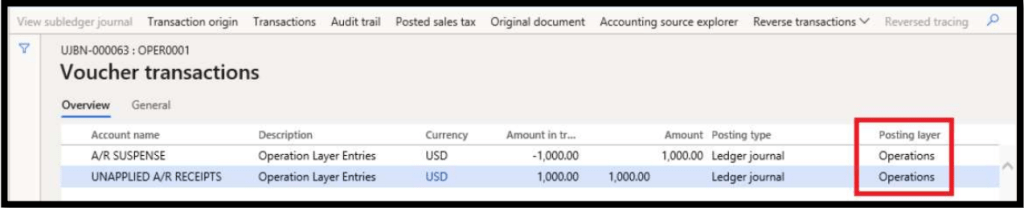
But as in US GAAPs It’s required to be $6,500.00. so, in this case we still have shortage of $2,500.00 ($6,500.00 – $4,000.00). For this delta we must pass adjustment entry of $2,500.00 in Operation layer.

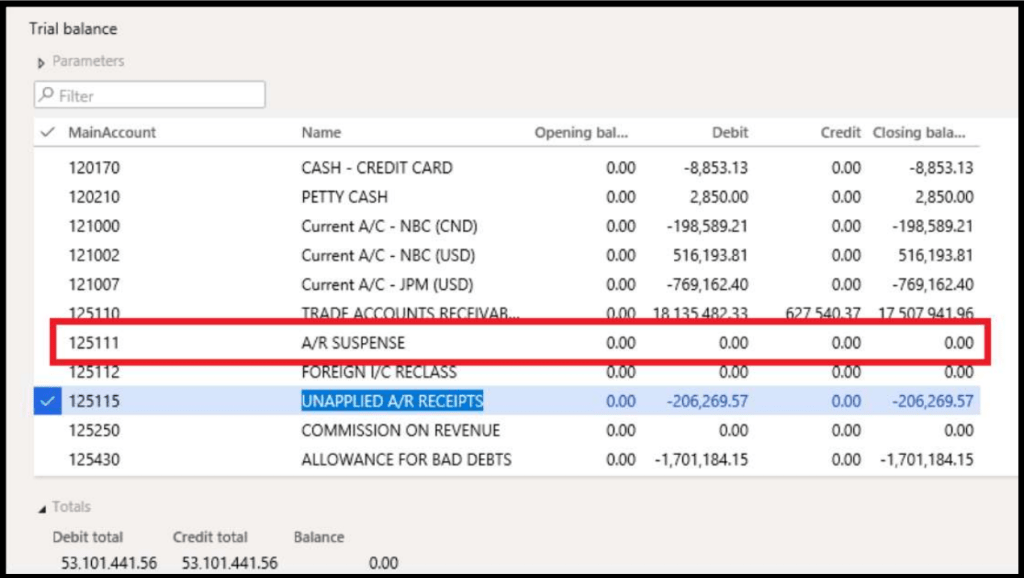
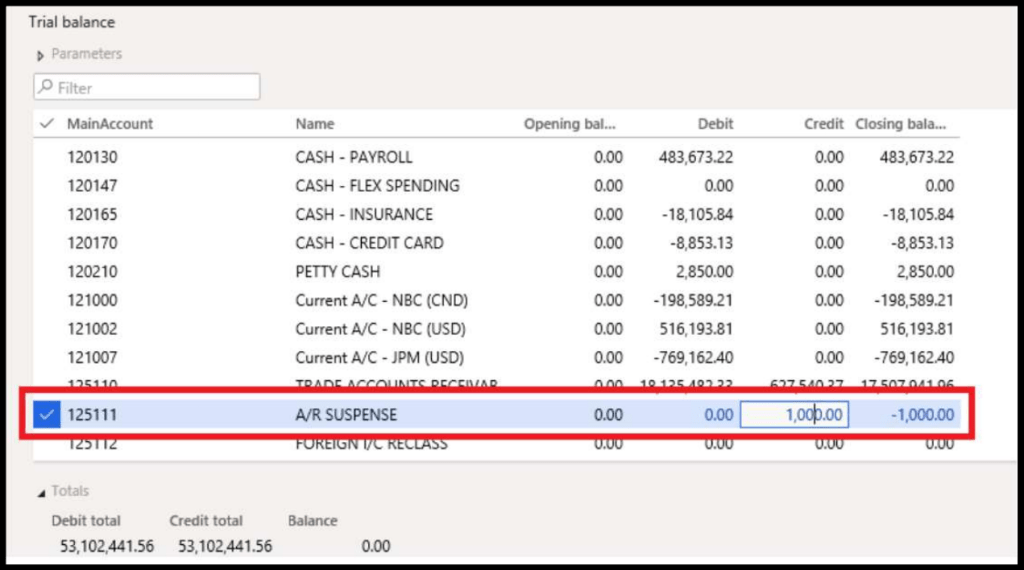
After posting this entry out trial balance with both layers (for US GAAPs) will be as following:

The following is an example from the system:
Accounting Voucher Posted in Specific Journal in the Operation Layer:
Trial Balance with only current layer:
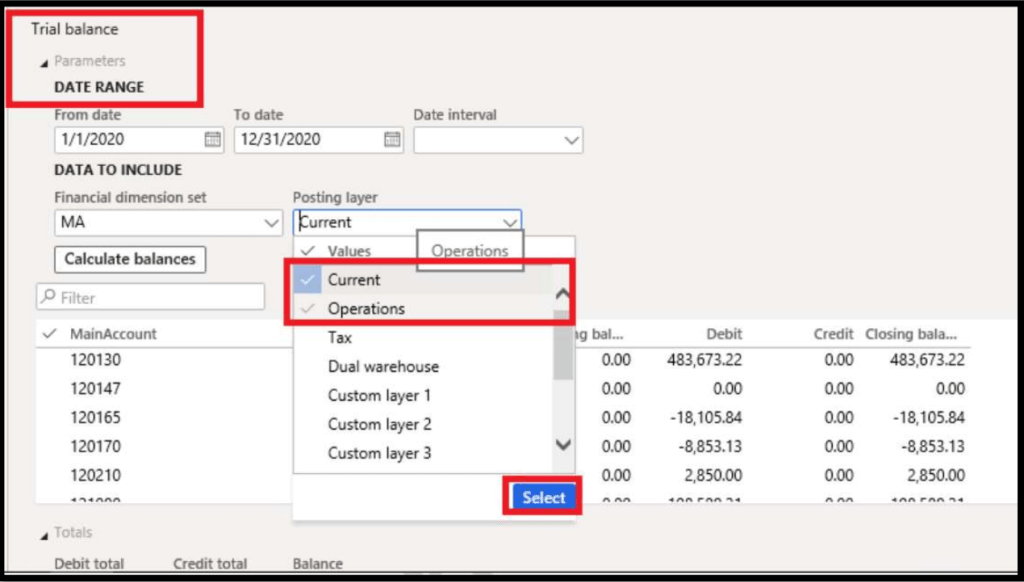
Option to Select the Operation Layer in Trial Balance Parameters:
Trial Balance with Current & Operation Layer:
Conclusion
Parallel accounting in Dynamics 365 Finance provides businesses with a flexible and efficient way to manage financial reporting across multiple jurisdictions. By leveraging Operational Layers, companies can maintain compliance with both local and global accounting standards while streamlining their financial processes.
Would you like to explore how Dynamics 365 Finance can optimize your accounting setup? Let’s discuss!


 Dynamics 365 Finance
Leave a comment