
Version 1.0.0 — a Chrome/Edge browser extension for extracting and comparing Dynamics 365 Finance configuration data across multiple legal entities, with multi-format export support.
What it does
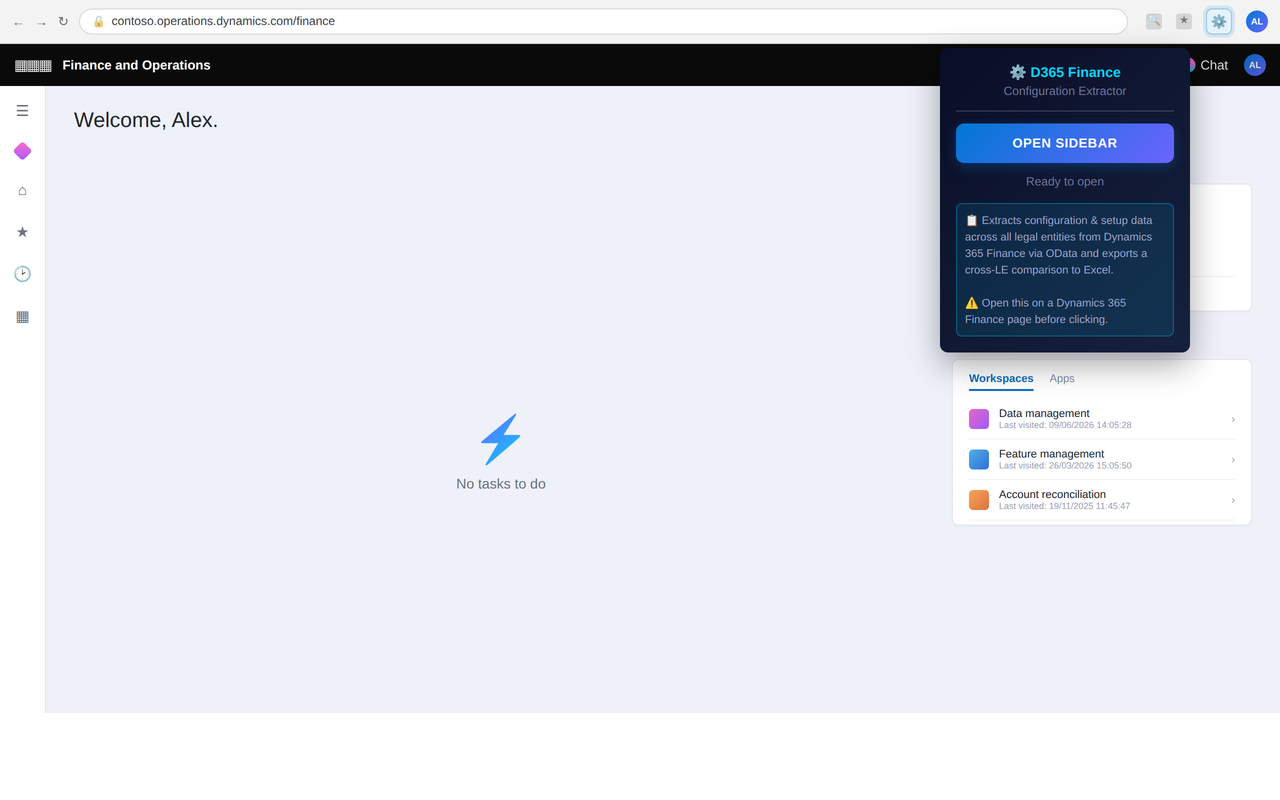
Comparing configuration across legal entities in D365 Finance & Operations usually means opening each entity one at a time and cross-checking manually. This extension pulls configuration-focused master and setup data straight from the D365F OData endpoints for every legal entity you select, then exports it to Excel with one sheet per entity — full field detail included, plus an automatically generated comparison report showing exactly where entities differ.
Key features
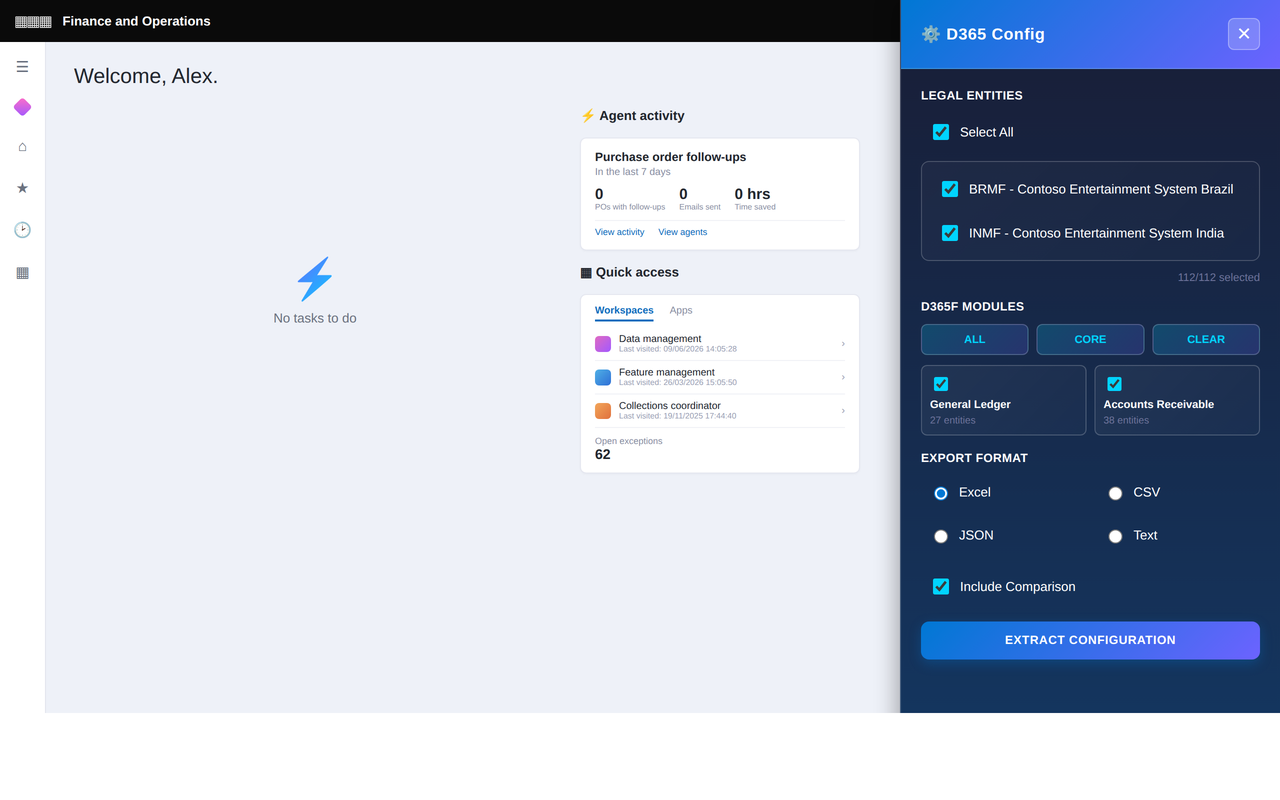
- Multi-legal-entity support — extract configuration from 100+ legal entities in one run
- Multiple export formats — Excel (.xlsx), CSV, JSON, and plain text
- Selectable output content — data only, comparison only, or both
- Configuration comparison — automatically flags differences between legal entities
- Audit-friendly summary — includes a skipped-entity list and extraction call stats
- Excel Copilot prompt — a ready-to-use reconciliation prompt is embedded in each export
- Session-based authentication — uses your existing D365F session, no extra credentials
- Real-time progress tracking — monitor extraction status as it runs
- IndexedDB-backed performance — handles large-scale extractions without choking the browser
Coverage: 285 entities across 16 modules
Entity names are the confirmed OData public collection names as exposed by the D365F /data service document. Coverage spans:
- General Ledger (27 entities)
- Accounts Receivable (38 entities)
- Accounts Payable (18 entities)
- Cash & Bank Management (19 entities)
- Fixed Assets (22 entities)
- Tax (30 entities)
- Inventory Management (24 entities)
- Project Management (16 entities)
- Organization Admin (17 entities)
- Budget (18 entities)
- Cost Accounting (15 entities)
- Human Resources (15 entities)
- Manufacturing (9 entities)
- Procurement (9 entities)
- Sales (10 entities)
- Consolidation (3 entities)
The full, module-by-module list of OData entity set names is in the Complete Entity Reference on GitHub.
How it works
- Navigate to Dynamics 365 Finance and make sure you’re logged in.
- Open the extension from its toolbar icon.
- Choose legal entities (or “Select All”), the D365F modules to extract, an export format, and whether to include data, comparison, or both.
- Click Extract Configuration and monitor progress in real time — typically 5–15 minutes for 100+ legal entities.
- Download the generated files from your Downloads folder.
The comparison report includes a summary of all legal entities compared, which entities are missing which configuration, record-level detailed differences, and a match/difference status per entity pair. Open the .xlsx output in Excel and the embedded prompt lets Copilot help you analyze the differences directly.
Security & privacy
- No credentials stored — it rides on your existing D365F session cookie
- All data stored locally in your browser (IndexedDB)
- No external APIs — everything stays inside your organization
- HTTPS only, and nothing is ever transmitted off your device
Full details: Privacy Policy.
Good to know
- One OData request per selected entity (not per legal entity), with a ~80ms throttle between requests
- Entity endpoints are validated live against the
/dataservice document before calls, with fallback naming patterns tried automatically - Pagination follows
@odata.nextLinkuntil all pages are read; failed entities are skipped and extraction continues - Each Excel sheet is capped at 50,000 rows for very high-volume entities — export those separately if you need every row
- High-volume transactional entities are intentionally excluded — this is a configuration/setup extractor, not a transaction dump
Get started
Grab it from the Chrome Web Store or Edge Add-ons, or clone the repo and load it unpacked for development (chrome://extensions → Developer Mode → Load unpacked).


